How to Start a Hyundai With a Dead Key Battery (Step-by-Step Guide)
If your Hyundai key fob suddenly stops working, don’t panic. A dead key battery is a common issue, and you can still unlock and start your vehicle. In this guide, we’ll explain how to start a Hyundai with a dead key battery, how to unlock the doors, and how to replace the battery so you can get back on the road quickly.
Signs Your Hyundai Key Fob Battery Is Dead
Before assuming something more serious is wrong, look for these common symptoms:
-
The key fob won’t lock or unlock the doors
-
Push-button start doesn’t respond
-
Reduced range when pressing buttons
-
Dashboard message like “Key Not Detected”
If you’re experiencing any of these issues, a dead key battery is likely the cause.
How to Start a Hyundai With a Dead Key Battery
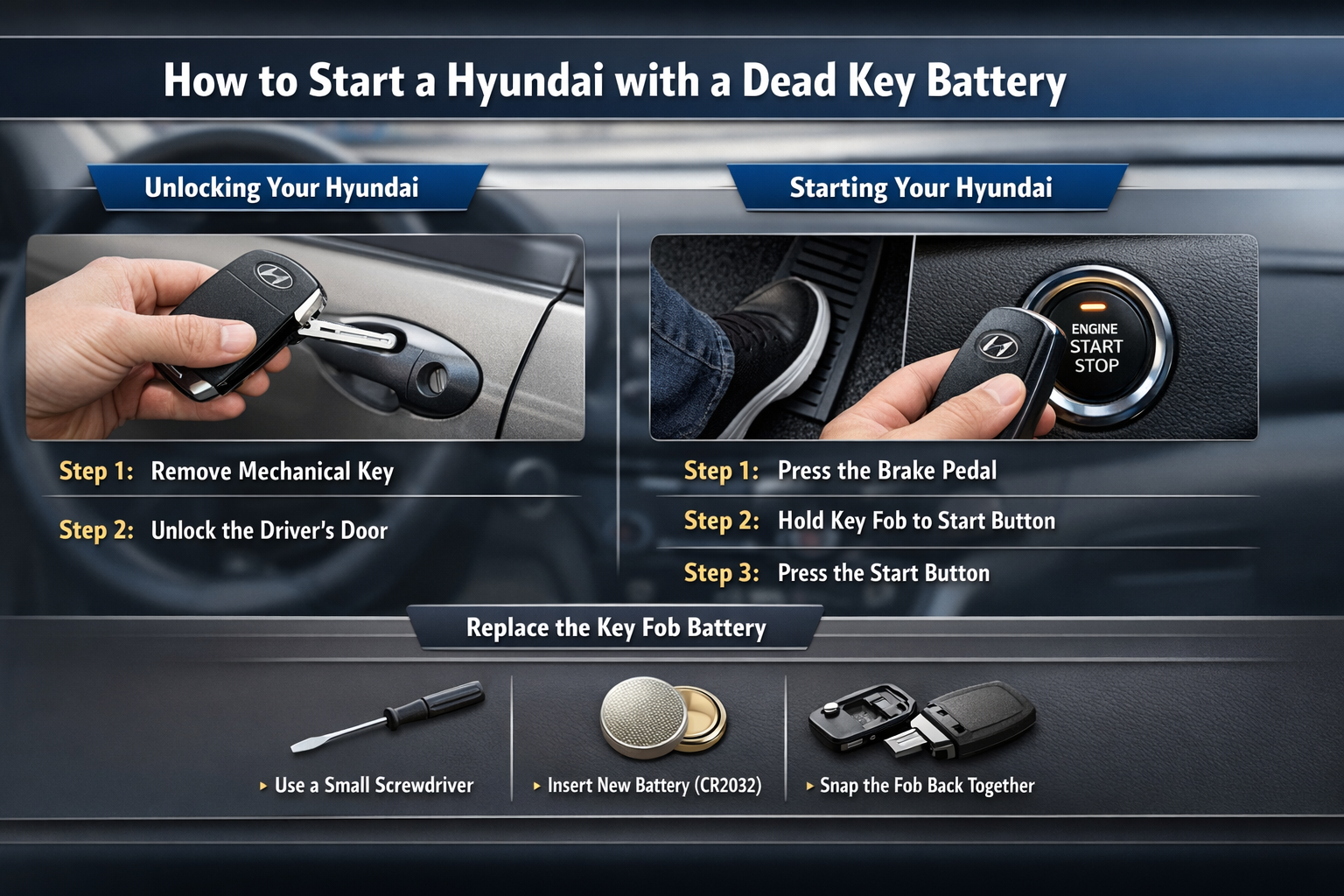
Even if your key fob battery is dead, your Hyundai key includes a hidden mechanical key.
If your Hyundai has a push-button start, follow these steps:
Step 1: Press the Brake Pedal
Make sure your foot is firmly pressing the brake.
Step 2: Hold the Key Fob to the Start Button
Place the key fob directly against the push-start button. In most Hyundai models, the vehicle can detect the key through short-range RFID technology—even if the battery is dead.
Step 3: Press the Start Button
While holding the key fob against the button and pressing the brake, push the start button. The engine should start normally.
This method works for most Hyundai models, including the Hyundai Elantra, Sonata, Tucson, Santa Fe, and Palisade.
What If Your Hyundai Has a Traditional Key Ignition?
If your Hyundai uses a physical key ignition:
-
Remove the mechanical key from the fob.
-
Insert it into the ignition.
-
Turn the key to start the engine as usual.
In this case, a dead key battery will not prevent you from starting the car—it only affects remote locking and unlocking functions.
How to Replace a Hyundai Key Fob Battery
To avoid future inconvenience, replace the battery as soon as possible.
What You’ll Need:
-
A small flathead screwdriver
-
A replacement battery (commonly CR2032 or CR2025 — check your owner’s manual)
Replacement Steps:
-
Open the key fob casing using the screwdriver.
-
Remove the old battery carefully.
-
Insert the new battery with the correct polarity.
-
Snap the casing back together.
Test the key fob to ensure it’s working properly.
Preventing Future Key Battery Issues
-
Replace the key fob battery every 1–2 years.
-
Keep a spare battery in your glove compartment.
-
Pay attention to reduced signal range—it’s an early warning sign.
Final Thoughts
Knowing how to start a Hyundai with a dead key battery can save you time, stress, and potentially a roadside assistance call. Whether you use the hidden mechanical key or hold the key fob to the push-start button, Hyundai vehicles are designed with backup systems to keep you moving.
If your key fob continues to have issues after replacing the battery, contact your local Hyundai dealership for further assistance.